
Shahadat Robin
Software Developer, LemonHive
5 days ago
When developing any modern web application - monitoring and error tracking are essential to ensure a smooth user experience. One of the best tools for this purpose is Sentry.io - Which allows developers to track and resolve errors in real time. If you integrate Sentry into your app can save you a lot of time and effort in debugging and fixing issues.
In this article, we’ll walk through automatic configure Sentry into a Next.js project.
Hold on! Before jump into the installation process, make sure that you have created sentry account.
Sentry provides an official setup wizard that automatically configures everything needed for a Next.js project. This is the recommended way to integrate Sentry, as it reduces manual errors and ensures best-practice defaults.
Run the following command from your project root:
npx @sentry/wizard@latest -i nextjsAfter running the command, the wizard will:
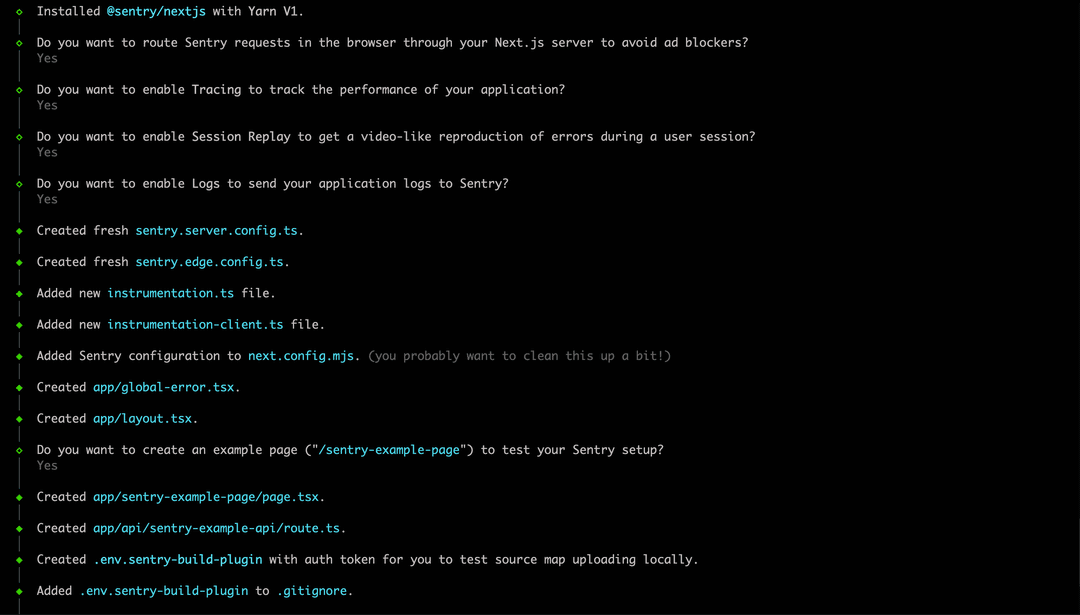
Choose the features that best match your project requirements.
Once the wizard finishes, several files will be added or updated in your codebase. These changes enable error tracking across client components, server components, API routes, middleware, and edge functions.
next.config.tsimport { withSentryConfig } from "@sentry/nextjs";
const nextConfig = {
// your existing config
};
export default withSentryConfig(nextConfig);Your next.config.ts file is now wrapped with withSentryConfig
Impacts:
// instrumentation-client.ts

import * as Sentry from "@sentry/nextjs";

Sentry.init({
  dsn: process.env.NEXT_PUBLIC_SENTRY_DSN,
  tracesSampleRate: 1.0,
});
Created this file for initializes Sentry on the browser/client side.
Impacts:
// instrumentation.ts

import * as Sentry from "@sentry/nextjs";

Sentry.init({
  dsn: process.env.NEXT_PUBLIC_SENTRY_DSN,
  tracesSampleRate: 1.0,
});
Created this file for initializes Sentry for server-side execution, including:
It ensures that server-side exceptions are captured before a response is sent to the client.
Created:
sentry.server.config.ts for Node.js runtimesentry.edge.config.ts for Edge runtime (middleware, edge functions)This separation is important because edge environments have stricter runtime constraints.
This file is used internally by Sentry’s build plugin to upload source maps securely during CI/CD or local builds.
Created or updated global error handler in your application to capture unhandled exceptions. For example, in a client-side component:
// global-error.ts

import * as Sentry from "@sentry/nextjs";
import NextError from "next/error";
import { useEffect } from "react";

export default function GlobalError({ error }) {
 useEffect(() => {
   Sentry.captureException(error);
 }, [error]);
 return (
   <html lang="en">
     <body>
       <NextError statusCode={0} />
     </body>
   </html>
 );
}Once Sentry is running in your Next.js application, you’ll start to see real-time dashboards that surface the health and performance of your releases. Below is an example of what the Sentry project overview page looks like, together with an error list.
Happy monitoring...
